Showing posts with label HP Pavilion G6. Show all posts
Showing posts with label HP Pavilion G6. Show all posts
[caption id="attachment_3722" align="alignnone" width="497"] The Gnome 3.8.2 desktop of the Korora Gnome fllavour. There's also a high-calorie KDE Korora. Click the image to enlarge.[/caption]
I'm posting from a live USB boot of a Fedora-based, Linux distro called Korora, version 19. This is the first of the Linux distributions I've tested (including every Ubuntu from 12.04 to 13.10), which has been able to get on line using the HP Pavilion g6's built-in wireless card, a Ralink RT3290 802.11bgn Wi-Fi Adapter. I've not been a fan of Gnome 3, but, I could learn to love it. But one thing that interested me about Korara's Gnome version is that it's supposed to include the new "Gnome 2-ish" classic mode, which i assume can only be accessed in a full install. This review makes it sound like the Korora team is aiming at the Ubuntu audience. GIMP 2.8 is already installed, along with Firefox 22, and I noticed VLC. Nice.
The reviewer preferred the KDE version, but I confess that I have had too many negative experiences with KDE -- nothing has more trouble with the truncated resolution of a 10.1-inch netbook screen than a KDE application. "Yes Virginia, all the important application buttons are in the 40 pixels off the bottom edge of the Acer Aspire One's screen!"
Anyway, Korora 19 seems to run well on the Pavilion g6. One thing about the Live USB, made using the Windows version of Fedora's LiveUSB Creator, is that I didn't specify any persistence, yet I've been able to take screenshots, and save the (fuzzy) GIMP edit at the top of this post. I assume the saved file is only "saved" in RAM [it is], and won't be there on a second boot [it wasn't], but I didn't expect to be able to save anything. Shows how little I know.
 Update -- Korora connected to the flakey McWi-Fi at the Broadway and Granville McDonalds -- It's so bad now, I normally use a nearby signal. So the previous success, in the Waves coffee shop at Broadway and Spruce, wasn't a one-off. Click the image to see the full screen.
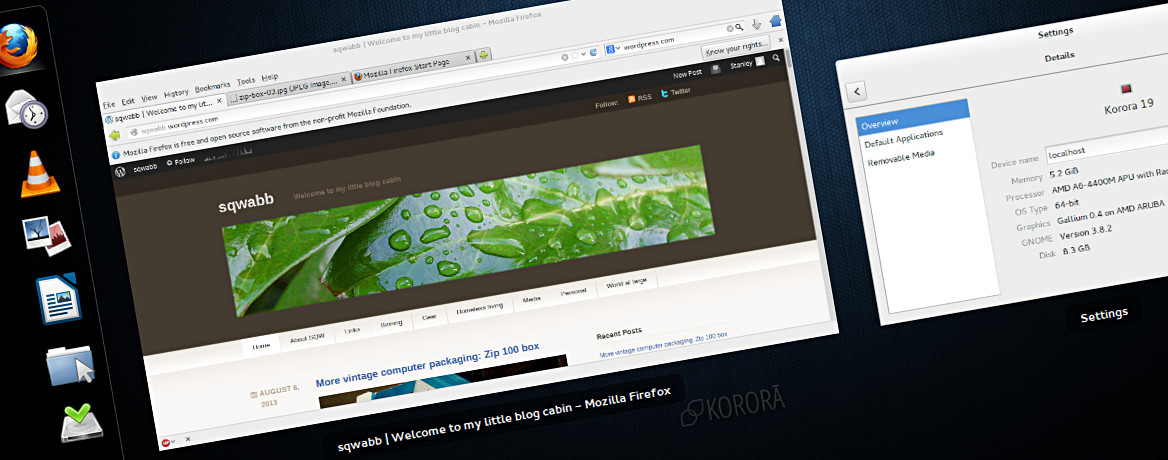 The Gnome 3.8.2 desktop of the Korora Gnome fllavour. There's also a high-calorie KDE Korora. Click the image to enlarge.[/caption]
I'm posting from a live USB boot of a Fedora-based, Linux distro called Korora, version 19. This is the first of the Linux distributions I've tested (including every Ubuntu from 12.04 to 13.10), which has been able to get on line using the HP Pavilion g6's built-in wireless card, a Ralink RT3290 802.11bgn Wi-Fi Adapter. I've not been a fan of Gnome 3, but, I could learn to love it. But one thing that interested me about Korara's Gnome version is that it's supposed to include the new "Gnome 2-ish" classic mode, which i assume can only be accessed in a full install. This review makes it sound like the Korora team is aiming at the Ubuntu audience. GIMP 2.8 is already installed, along with Firefox 22, and I noticed VLC. Nice.
The reviewer preferred the KDE version, but I confess that I have had too many negative experiences with KDE -- nothing has more trouble with the truncated resolution of a 10.1-inch netbook screen than a KDE application. "Yes Virginia, all the important application buttons are in the 40 pixels off the bottom edge of the Acer Aspire One's screen!"
Anyway, Korora 19 seems to run well on the Pavilion g6. One thing about the Live USB, made using the Windows version of Fedora's LiveUSB Creator, is that I didn't specify any persistence, yet I've been able to take screenshots, and save the (fuzzy) GIMP edit at the top of this post. I assume the saved file is only "saved" in RAM [it is], and won't be there on a second boot [it wasn't], but I didn't expect to be able to save anything. Shows how little I know.
 Update -- Korora connected to the flakey McWi-Fi at the Broadway and Granville McDonalds -- It's so bad now, I normally use a nearby signal. So the previous success, in the Waves coffee shop at Broadway and Spruce, wasn't a one-off. Click the image to see the full screen.
Cozying up to Windows 8 on the HP Pavilion g6 ►
[caption id="attachment_3624" align="alignnone" width="497"] A wallpaper to tide me over. It's rougher than I intended, and there's a typo. Click on the image to see the 1366 x 768 pixel image.[/caption]
I've put the Pavilion dv6000 in my storage locker, so I can "bond" with the Pavilion g6 -- same size, but half the weight, and twice the hardware specs of the dv6000. It doesn't feel twice as powerful, but it smoothly plays any HD video I can throw at it., and it's USB read/write is much faster. However, compared to the three or four earlier Pavilions I've played with, the g6 looks, and feels cheaper; the case actually creaks a bit. The real issue though, is Windows 8. Since my previous post on the same subject, I've done a few more things:
This is the doorstep Windows 8 drops you on when it finishes booting up. In principal it's supposed to be a dashboard the user can customize with live notifications, and stuff. By default, it's just an illustration of the Seattle Space Needle which is between you and the log-in screen. The function of both screens could be rolled into one, thus eliminating a step, but this would appear to go against Windows 8's "journey of a thousand steps" approach. The lock screen can be turned off several ways. I chose the easiest, a Registry hack, neatly packaged as two little apps -- one on, one off, courtesy of How-To-Geek.
Pinning is one of the ways Windows allows users to customize how they access the contents of their harddrive. The Taskbar is always visible along the bottom of the desktop, so I think it's a good place to "pin" frequently accessed applications, or directories, aka. folders. Apps can be pinned to the Taskbar from the right-click menu, but not folders. You have to make a shortcut, and in the right-click menu > Properties, add "explorer" at the beginning of the Target field. The instructions are here, scroll down to step 5. Under Properties I applied the basic User icon from the C:\Windows\System32\imageres.dll directory.
Boot screen > Lock screen > Login screen > Start screen > desktop screen; Windows 8 opens the way the Control headquarters opened in the credits of the 1960s TV series Get Smart, except in Windows 8 it's not funny. I installed Classic Shell 3.6.8, a freeware package of Windows enhancements, which goes back to the Vista days. Among other things, Windows 8 users can restore a desktop Start menu, and disable the Start screen.
The g6 is a 64-bit computer, so I kicked plain-old Firefox to the curb to try Waterfox, the 64-bit variant of Firefox. It's supposed to be way faster -- it's certainly not slower. I'm considering installing the Windows version of Banshee, an opensource audio player, which was once the default audio player included in Ubuntu, but for Ubuntu 12.04 was replaced with RhythmBox, which I don't really like. Banshee, which I do like, is built partly using the Mono development framework, which implements components of Microsoft's .NET development framework, and is thus controversial within the opensource community. I assumed the point of Mono was so Banshee code would be easily cross-platform for both Linux and Windows, yet the Windows version of Banshee is an alpha preview, and two versions behind the Ubuntu version! I installed the portable Windows version of Audacious, which is a very lean music player I use in Ubuntu. I'm not planning to install iTunes.
 A wallpaper to tide me over. It's rougher than I intended, and there's a typo. Click on the image to see the 1366 x 768 pixel image.[/caption]
I've put the Pavilion dv6000 in my storage locker, so I can "bond" with the Pavilion g6 -- same size, but half the weight, and twice the hardware specs of the dv6000. It doesn't feel twice as powerful, but it smoothly plays any HD video I can throw at it., and it's USB read/write is much faster. However, compared to the three or four earlier Pavilions I've played with, the g6 looks, and feels cheaper; the case actually creaks a bit. The real issue though, is Windows 8. Since my previous post on the same subject, I've done a few more things:

Turned off the lock screen
This is the doorstep Windows 8 drops you on when it finishes booting up. In principal it's supposed to be a dashboard the user can customize with live notifications, and stuff. By default, it's just an illustration of the Seattle Space Needle which is between you and the log-in screen. The function of both screens could be rolled into one, thus eliminating a step, but this would appear to go against Windows 8's "journey of a thousand steps" approach. The lock screen can be turned off several ways. I chose the easiest, a Registry hack, neatly packaged as two little apps -- one on, one off, courtesy of How-To-Geek.

Pinned a folder on the Taskbar
Pinning is one of the ways Windows allows users to customize how they access the contents of their harddrive. The Taskbar is always visible along the bottom of the desktop, so I think it's a good place to "pin" frequently accessed applications, or directories, aka. folders. Apps can be pinned to the Taskbar from the right-click menu, but not folders. You have to make a shortcut, and in the right-click menu > Properties, add "explorer" at the beginning of the Target field. The instructions are here, scroll down to step 5. Under Properties I applied the basic User icon from the C:\Windows\System32\imageres.dll directory.
Turned off the Start screen
Boot screen > Lock screen > Login screen > Start screen > desktop screen; Windows 8 opens the way the Control headquarters opened in the credits of the 1960s TV series Get Smart, except in Windows 8 it's not funny. I installed Classic Shell 3.6.8, a freeware package of Windows enhancements, which goes back to the Vista days. Among other things, Windows 8 users can restore a desktop Start menu, and disable the Start screen.
Installed more software
The g6 is a 64-bit computer, so I kicked plain-old Firefox to the curb to try Waterfox, the 64-bit variant of Firefox. It's supposed to be way faster -- it's certainly not slower. I'm considering installing the Windows version of Banshee, an opensource audio player, which was once the default audio player included in Ubuntu, but for Ubuntu 12.04 was replaced with RhythmBox, which I don't really like. Banshee, which I do like, is built partly using the Mono development framework, which implements components of Microsoft's .NET development framework, and is thus controversial within the opensource community. I assumed the point of Mono was so Banshee code would be easily cross-platform for both Linux and Windows, yet the Windows version of Banshee is an alpha preview, and two versions behind the Ubuntu version! I installed the portable Windows version of Audacious, which is a very lean music player I use in Ubuntu. I'm not planning to install iTunes.

Installing Ubuntu Linux on the HP Pavilion g6, which happily fell into my lap, will have to wait. Not because of UEFI, or Secure Boot, but because the wireless card -- the Ralink RT3290 802.11bgn Wi-Fi Adapter -- is too new for Ubuntu -- versions 12.04, and 12.10 couldn't see it at all, while Ubuntu 13.04 saw the card, and Wi-Fi networks, but couldn't connect to anything. Sadly, being able to simply download and install a Linux driver for the Ralink RT3290 is not an option, so far as I can see -- just not Linux-y enough.
[caption id="attachment_3377" align="alignnone" width="497"] I'd already seen the Windows 8 icon on the bottom of the laptop, but seeing the Metro Start screen was still a shock.[/caption]
The woman said it didn't work -- the HP Pavilion G6 pictured above -- that it was only good for parts. The yellow-tipped AC adapter was what caught my eye -- it looked right for the HP tank top. I told the woman if I did get it working, I'd wipe it clean, that I didn't care about her files, that I ran a different operating system. She had pretty, light hazel eyes that did "deer in headlight" beautifully. He boyfriend came out, having heard the salient points, and declared she didn't have anything on the laptop worth worrying about.
 I'd already seen the Windows 8 icon on the bottom of the laptop, but seeing the Metro Start screen was still a shock.[/caption]
The woman said it didn't work -- the HP Pavilion G6 pictured above -- that it was only good for parts. The yellow-tipped AC adapter was what caught my eye -- it looked right for the HP tank top. I told the woman if I did get it working, I'd wipe it clean, that I didn't care about her files, that I ran a different operating system. She had pretty, light hazel eyes that did "deer in headlight" beautifully. He boyfriend came out, having heard the salient points, and declared she didn't have anything on the laptop worth worrying about.
Subscribe to:
Posts (Atom)